One of the most practical tools in Innovation Assessments is Convo, our speaking task app built for teachers who want students to respond to prompts in a more authentic, manageable, and scoreable way.
At its core, Convo is simple: the teacher creates a conversation task using a sequence of prompt audios, students listen and respond one prompt at a time, and the teacher can later monitor progress, review submissions, and score the work using either simple prompt-by-prompt scoring or a fuller rubric workflow. But what makes the app useful is how much classroom reality it accounts for.
A teacher begins by configuring the task. The setup is intentionally straightforward: give the task a title, add context or directions, set an overall time limit, and decide whether each prompt response should also have its own time cap. That matters in speaking assessment, because sometimes you want students to think and answer naturally, not rehearse for several minutes. Teachers can also decide how students will complete the task. There is a browser-recording version for direct in-app speaking, and there is also an upload version for cases where device compatibility or student circumstances make recording in-browser less reliable. If a teacher wants tighter control, the task can require in-browser recording so response timing is enforced more strictly.
The prompt-building process is also flexible. Teachers can upload prompt audio files or record prompt audio directly in the browser while building the task. Each prompt can include a memo or script, which helps keep the assessment organized and teacher-friendly. This makes Convo work well for world languages, oral interpretation, speaking checks, listening-response tasks, and even teacher-created mock interview activities.
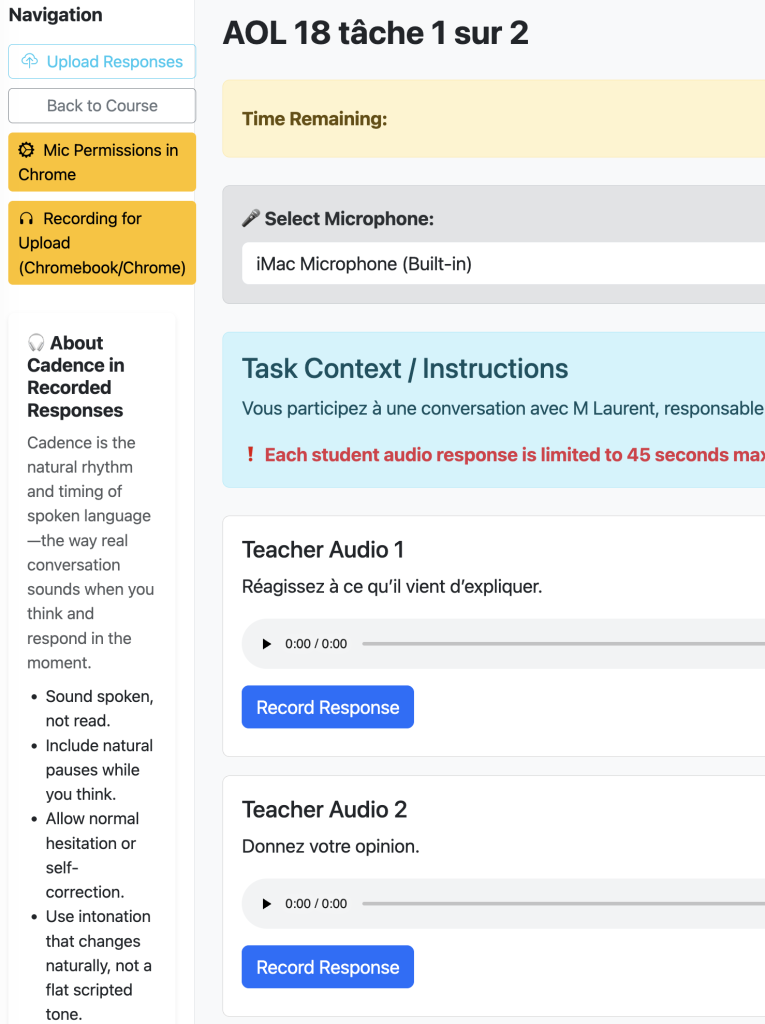
On the student side, the experience is designed to be focused. Students open the task, hear the teacher’s audio prompt, and respond prompt by prompt. The app supports real classroom constraints: access and visibility checks, timing, saved progress, and submission tracking are all built into the workflow. Students who have already submitted are not accidentally allowed to start over unless the teacher readmits them. That matters because speaking tasks can otherwise become messy very quickly if students are unsure whether they are still “in progress” or already finished.
Another strength of Convo is that it does not pretend every device behaves the same way. The app supports both browser recording and upload-based response collection, which gives teachers a practical fallback path when needed. In real schools, that matters more than elegant theory. A speaking tool only works if students can actually complete the task on the devices they have.
From the teacher side, monitoring is lightweight and useful. The teacher can open the monitor view and see which students are in progress, how many prompts they have completed, and who may need a readmit. This is helpful during live class use, language lab work, remote learning, or make-up assignments. The monitor is not overloaded; it gives the teacher enough visibility to manage the task without turning into a distraction.
Scoring is where Convo becomes especially flexible. Some teachers want quick scoring by prompt, especially when they are listening for completion, clarity, or general performance. Others want a more formal evaluation process. Convo supports both. A teacher can score by individual response or switch into rubric-based scoring, depending on how the assessment is designed. That means the same app can support quick formative checks and more structured summative speaking assessments.
There is also a strong accountability layer behind the scenes. Convo includes proctor-style event logging, submission tracking, and workflow protections that help preserve the integrity of the task. That is particularly useful for graded speaking work, asynchronous assessment, and remote completion settings where teachers want a clearer record of how the task was completed.
What I like most about Convo is that it is not built around a fantasy classroom. It is built around the real one. Teachers need prompt audio options. Students need a focused workflow. Some devices cooperate; some do not. Some speaking tasks need strict time limits; some need flexibility. Some teachers want quick scoring; some want rubric-driven feedback. Convo makes room for all of that.
In short, Convo is a speaking assessment tool designed for actual classroom use: easy to configure, realistic for students, adaptable across devices, and strong on both monitoring and scoring. It helps teachers move beyond “just record something and upload it” toward a cleaner, more intentional speaking workflow.
