The debriefing is a powerful tool for teaching to which students readily respond. I have had students tell me they really felt they benefited from these activities.
In general, the debriefing is a lesson that consists of analyzing student errors and offering corrections. Naturally, this is done anonymously so as to avoid embarrassment. It is particularly useful in teaching writing, computer programming, and similar complex tasks that can be broken down into smaller skill sets for training.
For example, when I teach French composition, I select errors from student compositions and present them anonymously to the class. I explain the error, I correct the error, and students then proceed to practice recognizing and correcting the error themselves. Innovation has a number of these lessons for sale at one of our online stores.
By way of another example, when teaching social studies, I help students develop skills for analyzing historic documents using constructed response tasks. This assignment calls upon students to provide historical or geographical context for a document and then to analyze its reliability and relationships with other documents such as cause-effect, turning point, or to compare and contrast. Especially for the reliability element, it is useful to display student work, both strong and weak, for commentary and analysis.
If you’ll indulge a final example, when I teach persuasive writing I like to display student samples in class and we can practice together identifying claims, warrants, rebuttals, and so forth. We can weigh the strength of arguments and of writing style.
21st century learning spaces are designed to facilitate debriefing for all sorts of tasks. Since this is a key feature of my own teaching practice, it is really baked in to the Innovation platform:
Multiple-choice: Teachers can start up a “live session” after a test to review. In the live session, the host displays the question and students join the session from their own devices and interact. (Kahoot! is a well-known example).
Short Answer: Teachers can initiate a “live session” for short answer that works the same way.
Jeopardy-Style Review: It is easy to select questions from a set of recent tasks such as quizzes or short answer prompts and then generate a Ventura game.
Analytics: Innovation has a complete set of analytics tools for all online tasks. This includes multiple-choice and short answer item analysis, standardized (“curved”) grading functions, and statistical analysis tools to evaluate and compare assessments. Analytics tells teachers what to debrief; what has priority for review and remediation.
Item Analysis: The test “master” for each assessment presents an item analysis of student work and a ready-to-display version of the test.
Debriefing lesson planning can be very arduous. It can be time-consuming to create a slide show or document with copy-pasted elements of student work submissions for analysis. The Innovation platform facilitates this in multiple ways with a few clicks, in true form to a strong 21st century learning space.
Marc Prensky’s 2001 article “Digital Natives, Digital Immigrants” sparked a lot of conversation, even debate, about the use of computers in education. Mr. Prensky proposed that students who grew up with digital devices integrated into their lives “think and process information fundamentally differently from their predecessors” and he posited that it’s “very likely that our students brains have physically changed” as a result of how they grew up (Prensky, 2001). Prensky characterized the older generation as populated by digital immigrants, whose more limited command of computer use was an obstacle to teaching these digital natives. His recommendations focused on what we would now call “gamification” of learning; “edutainment”.
In the two decades since the coining of the term, information and communication (ICT) technology has changed and many challenges legitimately arose to Prensky’s depiction.
I need a term for young people with extensive experience and skill with the digital world of commerce, entertainment, and social media. I would like to borrow Marc Prensky’s term “digital native”.
ICT Skills
The digital native is said to “possess sophisticated knowledge of and skills with information technologies” and to “have particular learning preferences or styles that differ from earlier generations of students”. (Bennett, et al. 2008).
Prensky, in my view, was asking teachers to bend their lessons away from sound educational practice to match the entertainment that students were used to experiencing when using computer technology. I believe this was his mistake.
The ensuing decades saw some challenge to these notions. Scholars posed legitimate challenges for the basis on limited and anecdotal evidence (Bennett, et al. 2008). Further research in the first decade after Prensky’s papers, while confirming the near ubiquitous use of digital devices by adolescents, found that “a significant proportion of students had lower level skills than might be expected of digital natives” and that “only a minority of the students (around 21%) were engaged in creating their own content and multimedia for the Web” (Kvavik, Caruso & Morgan, 2004, as cited in Bennett, et al. 2008).
I would propose that computer software, especially at this early period in the 2000’s but even still today, has been designed primarily for commerce, entertainment, and socializing. This is what Prensky and his supporters were seeing students use; skills in using this software was what students were developing. I submit that software designed to sell, entertain, and socialize has some features that are not supportive of an effective educational tool. Education needs platforms that engage students in what we know to be good learning practices. Prensky, in my view, was asking teachers to bend their lessons away from sound educational practice to match the entertainment that students were used to experiencing when using computer technology. I believe this was his mistake.
But we know that something is different. Those of us who were born before 1980 can attest to changes in adolescents that is associated with the digital age. In my view, this shift is better understood in less dramatic terms: as a cultural change of the sort that has been going on in civilization for millennia. The point is well taken that educators should adapt to this kind of cultural shift.
Thinking and Information Processing
Prensky posits that the extensive use of digital devices has changed how students think and process information. Digital natives are characterized as “accustomed to learning at high speed, making random connections, processing visual and dynamic information and learning through game- based activities” as well as multi-tasking (Bennett, et al. 2008). Not only do these assertions lack evidence, but I would argue that none of them lend themselves to right learning practice. Multi-tasking does not work for human beings (Napier, 2014), since it interferes with encoding in long-term memory and increases cognitive load.
In addition to the lack of evidence to support the assertion that digital natives thinking is significantly different from previous generations, Bennett et al note that “the claim that there might be a particular learning style or set of learning preferences characteristic of a generation of young people is highly problematic.”
While there is some overlap between engaging in digital experiences for commerce, entertainment, and social media and for education, experience has taught me that there are some fundamental differences. Digital teaching platforms should reflect sound educational practice and practical application to classrooms.
But we know that something is different. Those of us who were born before 1980 can attest to changes in adolescents that is associated with the digital age. In my view, this shift is better understood in less dramatic terms: as a cultural change of the sort that has been going on in civilization for millennia. The point is well taken that educators should adapt to this kind of cultural shift. However, where I diverge from Prensky is here: effective teaching practice does not mean that we adopt the ways of commerce, entertainment, ans social media in wholesale fashion.
What are young people doing with media? An alternative framework for understanding how adolescents use technology is one which maps out the skills adolescents possess across different digital media. “[T]ransmedia skills are understood as a series of skills related to the production, management and consumption of digital interactive media” (Scolari, 2019).
“[T]ransmedia literacy turns [the] question around and asks what young people are doing with the media. Instead of considering young people as consumers taken over by the screens (television or interactive screens, large or small), they are considered ‘prosumers’ able to generate and share media content of different types and levels of complexity” (Scolari, 2019).
Let us redefine the “digital native” as the typical adolescent who has an uneven skill set for media, having come from immersive digital experiences in games, commerce, and social media. Let us recognize that, while there is some overlap, the approach students need to be taught to cultivate toward digital devices as learning tools has some important and very fundamental differences from what they have done before.
“[T]he concept of “digital native”, understood as a young person who “comes with a built-in chip” and who moves skillfully within digital networked environments, shows more problems than advantages” (Scolari, 2019).
In terms of transmedia skills, we still have some things to teach students. Strong skill sets are not evenly distributed (Scolari, 2019). Students come to us skilled in the areas they use most, engaging in entertainment, commerce, and informal social interaction. Skills linked to production are usually strong in adolescents, but those associated with related to ideology and values are more limited.
Scolari writes: “at an individual level, a young person who demonstrates that they have advanced photographic production skills (creation of memes) or audiovisual management skills (a YouTube channel) can, at the same time, have less developed abilities in, for example, detecting stereotypes or managing privacy.”
A Revised Definition
We who have been teaching for decades know that there is a cultural shift going on that is related to information and communication technology. The term “digital native” coined by Prensky lacks a firm foundation and may well be more a reflection of the time it was conceived than anything else. In addition, it seems to me that the current generation of beginning teachers are in no way digital immigrants, having themselves grown up with extensive digital experience.
Adolescents use technology extensively and this does affect their starting point for education. We teachers can capitalize on the skills they possess already in the classroom while refining those they may lack and discouraging adolescent practices that are detrimental (like attempting to multi-task).
Let us redefine the “digital native” as the typical adolescent who has an uneven skill set for media, having come from immersive digital experiences in games, commerce, and social media. Let us recognize that, while there is some overlap, the approach students need to be taught to cultivate toward digital devices as learning tools has some important and very fundamental differences from what they have done before. The platforms we use to teach them in the digital world should reflect this. I would term these apps “21st century learning spaces“.
Striking a Balance: Leveraging Innovation Teaching Platform for Effective Pedagogy
In the ever-evolving landscape of education, the debate between teaching to the test and teaching to the standard persists, presenting educators with a perpetual challenge: how to strike a balance between preparing students for standardized assessments while also ensuring they acquire the essential knowledge and skills outlined in educational standards. Fortunately, innovative teaching platforms like Innovation Assessments offer a multifaceted approach to pedagogy that can help educators navigate this delicate balance and promote best practices in teaching and learning.
Utilizing Comprehensive Learning Management:
At the heart of the Innovation teaching platform lies a comprehensive learning management system designed to streamline content creation, assessment, and student engagement. By leveraging this robust platform, educators can seamlessly align their instruction with established educational standards while also incorporating targeted test preparation strategies.
Balancing Test Preparation and Conceptual Understanding:
Innovation Assessments provides educators with the tools to integrate test preparation within a broader framework of standards-aligned instruction. Through features such as customizable assessments, practice drills, and automated grading, educators can ensure that students receive targeted support in mastering both the content knowledge and test-taking skills necessary for success on standardized assessments.
Fostering Inquiry-Based Learning:
One hallmark of effective teaching practice is the promotion of inquiry-based learning, which encourages students to explore, question, and construct their understanding of the world around them. With its diverse array of multimedia resources, interactive activities, and collaborative tools, the Innovation platform empowers educators to create engaging learning experiences that foster curiosity, critical thinking, and problem-solving skills in students.
Personalizing Instruction to Meet Diverse Needs:
Recognizing that every student is unique, the Innovation platform offers personalized learning features that allow educators to tailor instruction to meet the individual needs, interests, and learning styles of their students. From adaptive assessments that adjust to students’ proficiency levels to customizable learning pathways that provide targeted remediation and enrichment, educators can ensure that each student receives the support and challenge they need to succeed.
Empowering Educators with Data-Driven Insights:
In addition to facilitating student learning, the Innovation platform equips educators with valuable data-driven insights into student performance, engagement, and growth over time. By analyzing student data and trends, educators can identify areas of strength and weakness, inform instructional decision-making, and implement targeted interventions to support student success.
Promoting Continuous Professional Growth:
Lastly, the Innovation platform serves as a catalyst for educators’ continuous professional growth by providing access to a wealth of resources, professional development opportunities, and collaborative communities. Through ongoing training, peer collaboration, and reflective practice, educators can refine their pedagogical approaches, stay abreast of emerging best practices, and ultimately elevate the quality of instruction in their classrooms.
In conclusion, while the debate between teaching to the test and teaching to the standard may persist, innovative teaching platforms like Innovation Assessments offer a holistic solution that transcends this dichotomy. By harnessing the power of technology to integrate test preparation within a broader framework of standards-aligned instruction, foster inquiry-based learning, personalize instruction, empower educators with data-driven insights, and promote continuous professional growth, the Innovation platform emerges as a potent tool for promoting best practices in teaching and learning. As educators embrace this multifaceted approach, they can navigate the delicate balance between preparing students for standardized assessments and equipping them with the knowledge, skills, and dispositions needed for success in the 21st century and beyond.
When I was developing an app for synchronous chat, my eighth, ninth, and tenth graders were only too happy to be my beta-testers. It was in the last month before I was to retire and so I wanted to make good use of my time remaining, especially preparing students for the conversation part of the regional world language examination in French. The chat app arose out of the desire for an effective method for students to communicate in the lesson in a paired situation, in a 21st century learning space.
Synchronous Online Discussion in a Co-located Classroom Setting
A number of advantages to blending online discussion tools in the classroom present themselves. In peer face-to-face interactions, “student differences in social status, verbal abilities and personality traits cannot guarantee equal participation rates (Chinn, Anderson, & Waggoner, 2001, as cited in Asterhan & Eisenmann). High-status, high-ability and extrovert peers may often dominate the discussion and group decision making” (Barron, 2003, Caspi et al., 2006, as cited in Asterhan & Eisenmann). Online discussion tools can reduce these factors and present a more egalitarian framework for participation.
Having students in the same room communicating with each other on a chat system may seem odd at first glance, but in addition to the benefits noted above, there are some practical benefits especially for the secondary level. The presence of an adult will ensure more on-task behavior and more appropriate behavior (no “flaming”, for example). Students may not all have equal access to home internet services such an an asynchronous model would demand. Furthermore, the synchronous model greatly ensures that the task will get done. Asynchronous assignments often fall down to procrastination, a typical foible of the adolescent. A literature review by Asterhan and Eisenmann reveal that “[c]ommunication in synchronous discussion environment is closer to spoken conversation and therefore likely to be more engaging and animating than asynchronous conferencing (McAlister, Ravenscroft, & Scanlon, 2004, as cited in Asterhan & Eisenmann). Students have also been found to be more active and produce more contributions in synchronous, than in asynchronous environments (Cress, Kimmerle, & Hesse, 2009, as cited in Asterhan & Eisenmann).”
When used during the class period, synchronous chat is a small part of a larger lesson which includes scaffolding, participation, and debriefing.
Early synchronous chat software such as reviewed in the study by Asterhan and Eisenmann had some practical limitations for class discussion. Instant messaging or threaded discussion boards both work on precedence by chronology, which makes conversations difficult to follow and so may actually defeat the purpose of the exercise. Some teachers have attempted to use FaceBook or Twitter to facilitate class discussions. These platforms were designed to satisfy a commercial interest.
A 21st century learning space paradigm provides the necessary structure (guardrails and training wheels) to maximize quality participation frequency while eliminating concerns about privacy and advertising.
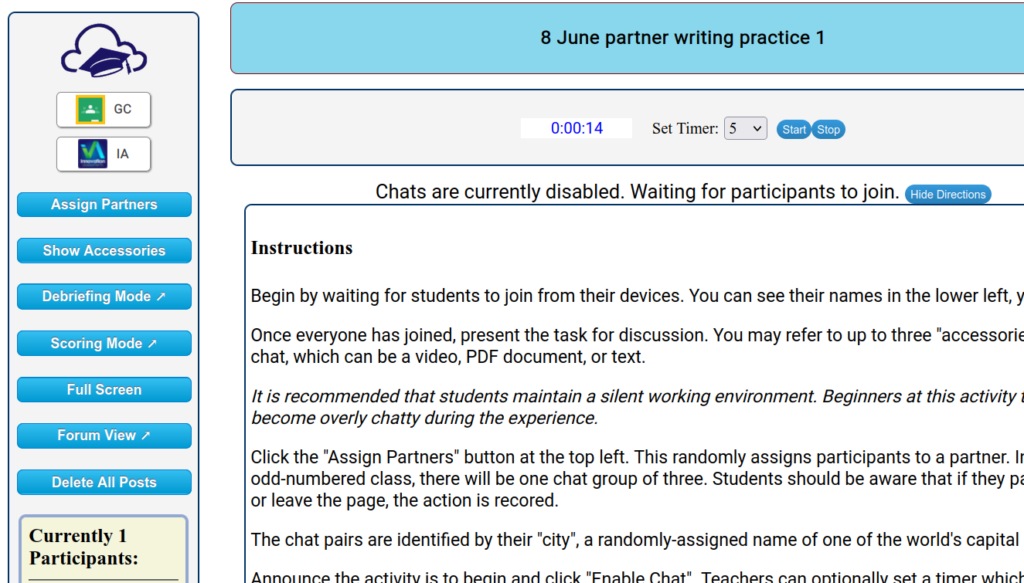
How it Works
The chat app works like this: the teacher opens a chat session and displays the host control dashboard on the large screen. Next, students join the session from their devices and once everyone is onboard, the teacher explains the assignment. The teacher then clicks the control to generate random partners and then to enable the chat session. A timer can optionally be set. Students engage in a real time discussion to carry out the task for the allotted time. During this session, the teacher can display the current chats going on (anonymously, of course) and offer any coaching that would be useful. At the conclusion of the time, the host closes the chat session and can debrief by displaying the chats and offering comment. The chats are anonymous: unless students introduce themselves in live session, they do not know necessarily who their partner is. The pairs are organized by “city”, a nickname generated by the app to identify them from a list of world capitals.
Host Screen Displayed at Front
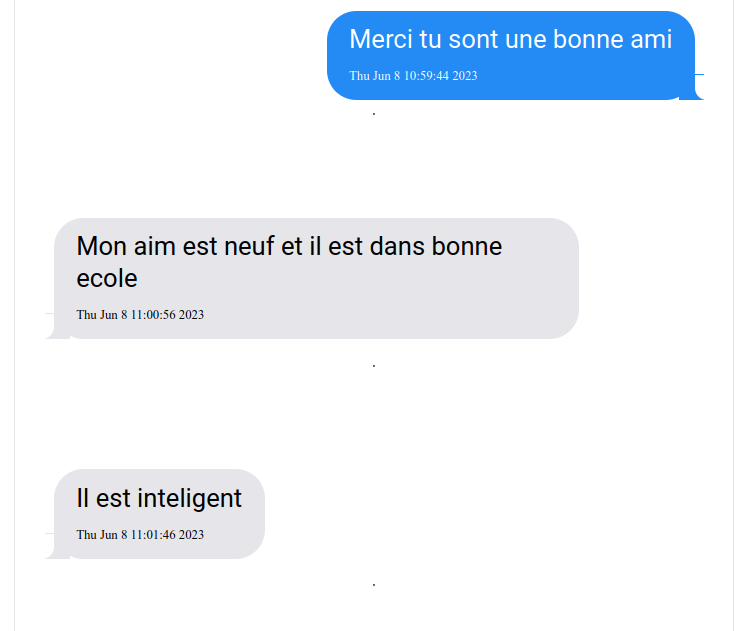
The first issue that developed was that they enjoyed it (not necessarily a problem but…). It caused a lot of “real” chatter in class as students chuckled about funny things others had said or trying to find out who their partner was. Older students who were more serious about their studies also were motivated to communicate outside the chat session to strategize in real time addressing their assignment. My tenth graders were assigned to use the chat as a writing exercise, such that they answered the prompt by collaboratively composing a paragraph. When a class is engaged in this activity, they need to be trained to maintain a mostly silent room, focused on the task and not the distractions.
A second issue that arose in the early version of the app was that students would forget the prompt or instructions. It was easy to modify the app to allow the teacher to attach “accessories”: text, video embed, and/or a PDF document with the assignment and rubric displayed. Now students could refresh their understanding of the assignment by clicking a button.
Sometimes a student would leave the chat window to another browser tab to look something up. For situations where is is not allowed, I modified to app to include a “proctor” that records right in the app when a student leaves the window and when they paste in text.
Research on this sort of application support the practice of including assessment in the activity (Gilbert and Dabbagh, 2005, as cited in Balaji & Chakrabati, 2010). Students are aware of the rubric and are graded, which has an enhancing effect on their performance as they are often more mindful of their progress. Using the timer, which displays in the front of the room from the teacher’s host screen is also helpful. If one is pressed for time, one is less likely to be off-task without knowing it.
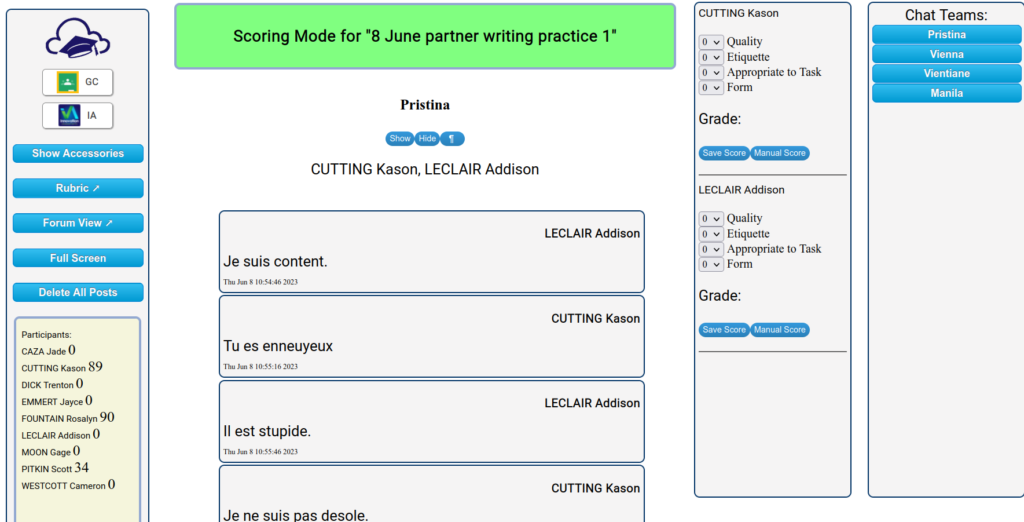
In keeping with the paradigm of the 21st century learning space, the app lends itself well to assessment and debriefing. The assessment screen makes it easy to assess student work on a built-in rubric.
Scoring Controls
Students can see their scores and comments.
I developed this in the context of teaching French, but its application to other subjects is clear. For example, a social studies lesson could include a document or video segment for students to analyze or a short discussion on a topic from lecture.
The chat application is designed as a 21st century learning space .
Guardrails: The proctor for the chat app reports on text paste-ins and leaving the browser tab.
Training Wheels: The optional accessories can provide the scaffold support for the discussion. The optional timer supports on-task behavior.
Debriefing: In debriefing mode, anonymized student contributions to chat can be displayed for analysis and discussion.
Assessment and Feedback: In scoring mode, an efficient system of evaluation saves time and offers students significant feedback.
Swiss Army Knife: The chat can be viewed in discussion mode, where other features can be applied such as identifying logical fallacies and replying to the posts of students other than one’s assigned partner. In forum mode, the teacher can participate.
Locus of Data Control: The student chat submissions are stored on a server licensed to the teacher’s control. Commercial apps such as FaceBook and Twitter may be less dedicated to the kinds of privacy and control exigencies of education.
Synchronous chat turned out to be a hit in my French class. It provided a solid and effective tool for engaging everyone in the lesson and made me feel like my time was well spent. In the next academic year (2023-24), I will be teaching an online synchronous college level French course. Look for posts next fall where I share how the new app went over in that class.
During the pandemic, many office workers moved to remote work from home. This precipitated a rise in monitoring software that companies could use to ensure that, being at home, workers were productive. An article in Forbes Magazine from 2021 reports that “[d]emand for worker surveillance tools increased by 74% compared to March 2019.” This rush to monitor and micromanage turned out to be unnecessary, as fears of a loss or productivity proved unfounded and “94% [of companies] reported that worker productivity either stayed at the same levels or improved.”
But this is not the case with adolescents.
The traditional classroom had to be a “very supervised” place because, by virtue of the fact that they are immature, most of our charges need guidance to get back on track. It is one reason why remote learning went so badly for many youngsters: it is not in the nature of most to be focused. The executive functioning needed to ignore distraction, set goals and reasonable timelines for work, even to break a longer task up into smaller, achievable segments is rarely present in adolescence. Until this develops, the role of the instructors includes teaching this skill and guiding students to follow the right course. Teaching with digital devices at present has reduced much of this supervisory ability. 21st century learning spaces would come with an array of monitoring and accountability features.
Data […] promotes accountability, but it also puts the student potentially in the driver’s seat and that is what developing executive functioning is all about.
I recall an instance where a student of mine was completing the essay portion of an examination remotely. I was able to monitor his examination in real time using software that shared his screen with me. When I noticed that he was typing sentences that appeared beyond his ability, I was able to google those phrases and find the source he was plagiarizing from online (he had his phone with him to cheat). This monitoring software allowed me a virtual way to simulate normal classroom supervision and to take the natural step of concluding the examination and award no credit.
After the pandemic, I continued using digital tools for student work. My students all had ChromeBooks. I had a student who was clever in taking advantage of a certain doubtfulness about technology by some adults around him. Faced with an incomplete assignment, he would claim he did it and that the app must have “lost his work”. He would claim that it “did not save”. In a traditional classroom, I would have seen his paper and whether it was written on, but the digital work did not include this monitor yet. I adjusted the software for his writing assignments to report when a response was deleted, when a student left the browser page for another, when students pasted text in, and even double-check the server to ensure an answer was saved. These application features returned important accountability assurances that were initially lost when moving to digital devices.
As time went on, my colleagues and I devised further modifications to the software at Innovation. I developed the “proctor” on important apps for testing and writing.
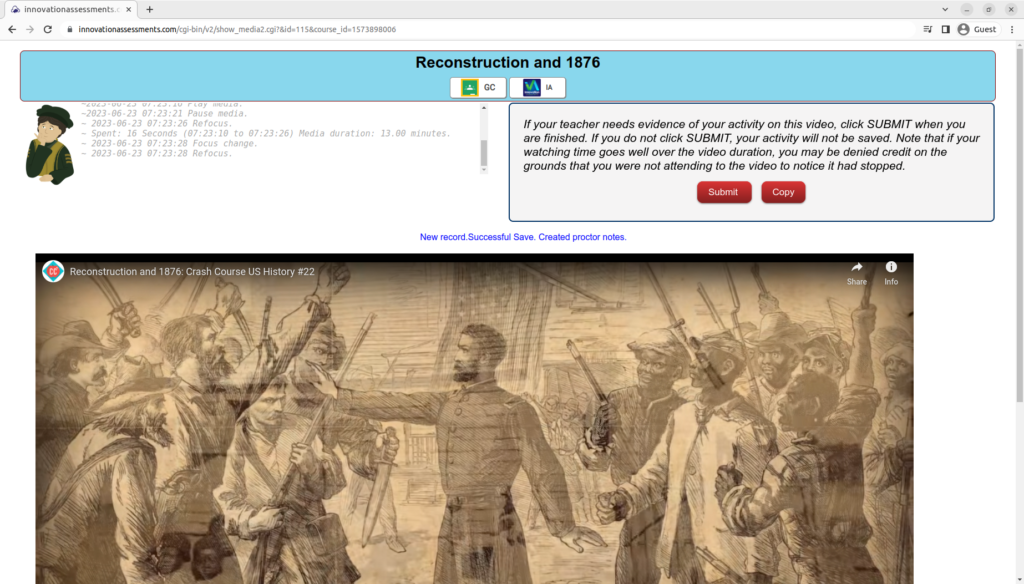
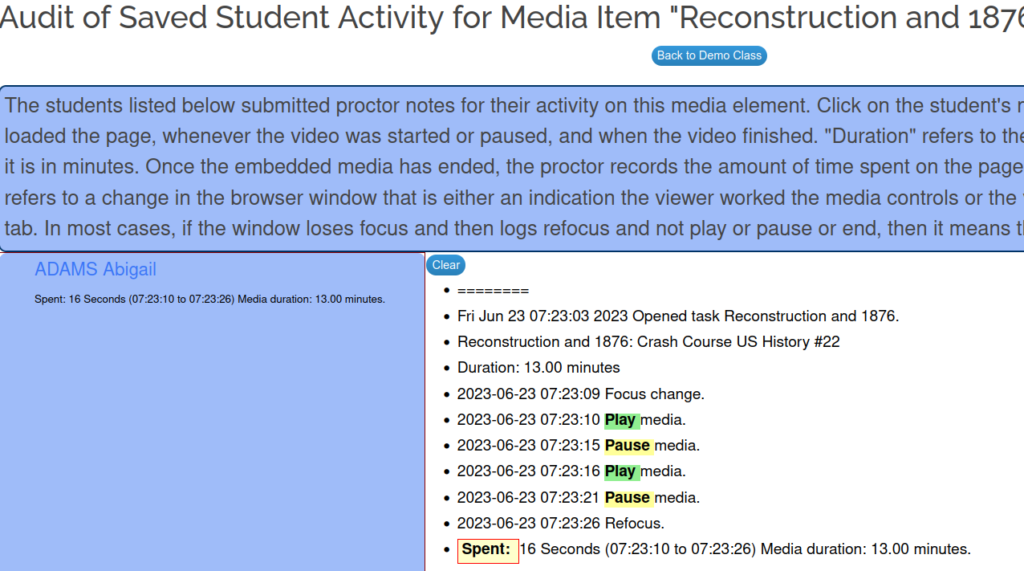
The proctor records data about the page and the students’ interactions with the assignment. Depending on the particular assignment, it records when work has begun, when an ancillary resource like a video has successfully loaded, when a student leaves the page and for how long, when text is pasted in, and when answers are saved. The proctor is visible to students (see illustration above) so they know their work is being monitored.
My colleague in the science department uses a flipped classroom technique. He made a great suggestion for the development of an app to monitor student interaction with a video assignment. As a student watches a video assignment, proctor records events like start video, stop video, how long between pauses, when the video ended, and how long the student was there.
The tracking monitor helped maintain a system of accountability for students.
Besides the proctor, Innovation tracks student activity around the site. The auditor maintains a record of logging in, accessing a course, starting a task, saving work, getting a score, etc.
The critical work of developing executive functioning in adolescents can be enhanced by providing youngsters the kind of data that, if they attend to it, can inform their decisions about what they should do. The proctor and other reporting tools are available to all students. Although consequences for missing the mark on attention to task can and should be part of the program, it is not great practice to be all sticks and no carrots. Objective data on what a teenager is actually doing (rather than what they remember they did or want you to think they did) can be the focus of discussions about on-task behavior and how the individual can take responsibility for it. We can take a look at performance on as assignment and examine on-task behavior related to its production. Could on-task behavior have improved the final product?
Data like this promotes accountability, but it also puts the student potentially in the driver’s seat and that is what developing executive functioning is all about.
My first experience using computers to teach was in 1993 when I was teaching French at a small, rural school in the Adirondacks. When the US Air Force base in Plattsburgh, New York closed, it donated its old computers to regional schools. They were “286s” that basically only ran, well, BASIC! Fascinated, I taught myself BASIC and started writing programs to drill vocabulary and verb conjugations. I really have not stopped coding educational apps since. It turned into a very stimulating hobby and very useful for my teaching practice. (When we were doing remote learning during the pandemic, my students were already operating in a digital classroom and remote learning was easy!)
Those old “IBM Compatible” computers were designed by computer engineers for the business world. The input interface was a keyboard (for typists and secretaries who, in the old days, were the only ones in the office who needed to learn to type). The big, boxy device was designed to sit on an office desk. The software ran programs like simple word processors and spreadsheets. These are also office utilities. You begin to see where I am going here?
Computers like these were initially devised to increase the efficiency of offices. They were for business.
I saw my first computer game at my cousin’s house when I was in middle school. His family had an Atari system. That was also where I first saw coding in BASIC. I saw the early computer game, Pong, at a restaurant when I was in my early teens. And there was Space Invaders at the arcade in Old Forge… And there was an arcade at the Fairmount Fair mall … You begin to see where I am going now?
Computers like those were devised for entertainment. Whether for entertainment or for commerce, the whole paradigm was intended for purposes other than education.
I was computer coordinator in my school at the time when computers and internet first migrated into schools. I was there in the heated discussions over whether we use Mac or IBM. I helped wire our school for internet and networking. I ran cables through crawlspaces and attic spaces in the 70-year old school. Talk was about what kids will need in this computer age and mainly we felt they needed skills associated with business, so when we adopted devices that were primarily designed for offices and plunked them in classrooms we figured it was good. Computer labs were de rigueur in the late 90s and early 00’s. Each classroom in my school had four or five PCs, which we built in a basement workshop. We were running Windows, Microsoft Office, PowerPoint, and so forth. We were trying to bend a device and its software that was designed for business and entertainment to classroom use.
By 2012, smartphones had become ubiquitous among students and this led to a number of other problems. Young people mainly play games and socialize on their devices. Socializing mediated by social media platforms has made changes and caused problems we are only beginning to unravel.
People use digital devices to engage in commerce, participate in entertainment, and to socialize. These being the principle purposes of the devices, they shape the course of design not only of the physical device itself but the software and features that the devices host.
My thesis is that when we brought these devices into schools, right from the beginning, we were trying to repurpose things meant for commerce, entertainment, and socializing into an environment where none of those was our pedagogical purpose. Sometimes it fits, sometimes it does not.
What do apps look like that are devised for education?
I use the phrase “21st Century Learning Spaces” to refer to a digital device and its software that fit education well because it is designed for that purpose and not repurposed from some other setting. I don’t build digital devices, but I do write software. For the past ten years, my colleagues and my students and I have been dissatisfied with bending apps to serve an educational function and having it not quite fit. Every try to use Google Forms to give a quiz? Is that really easier than what we used to do?
I hope you will join me in the next few posts and permit me to unpack the 21st Century Learning Space concept with its implications, limitations, and applications to education. I hope teachers will try out Innovation Assessments and see whether I have managed to meet some of the criteria for educational apps in a 1:1 device classroom.
Play is an important part of growing up. Trying out roles, acting out adventures… imagination! Here are some improv activities adapted to the classroom with some rubrics.
I first saw these on a TV show in the ’90s called “Whose line Is It Anyway?” where comedians performed improv scenes. I adapted them to teaching French at the time in order to develop conversation skills and improvised speaking in a fun lesson. When I switched to social studies in ’04, I sometimes used these at the end of a unit.
Stranger in Town
This activity must have a real name among improv comedians, but I just called it this. Three volunteers come to the front of the room. One goes out into the hallway briefly, out of earshot. The two who are left quickly agree on a scene they will perform for 3 minutes. The person in the hall, the “stranger”, is invited in and the scene commences. After 3 minutes, the stranger has to guess who they are based on the scene, in which, by the way, they had to participate. Imagine walking into a room and finding out you’re Henry VIII!
Here’s a sample setup for a social studies class where students had chosen their activity in advance and I had prepared it. To save time, I would sometimes generate the scenes for stranger in town and have teams roll the dice to see which to play. The identity of the person playing “stranger” was always a surprise!
The volunteer goes to the front of the room, preferably to a lectern, and pretends to be some famous person in history. The class are reporters whom she will call upon to ask questions. Pretend you’re Hannibal and you’ve just gotten your army with your elephants over the Alps. Can you answer some questions from our reporters before you disembark?
Although I often had students prepare for these if they weren’t confident, it can be an improv exercise for the brave and bold. Let it be a surprise to the volunteer whom they will play!
Newscast
Two volunteers for newscast come to the front of the room to play reporters who are to report on a scene from history. They don’t know what they scene is until they get there! (Presumably this is at the end of a unit and the scenes are from the current topic of study). One student plays the anchor at the desk which the other is “in the field”, a reporter on the scene. A third student may participate as a bystander whom the reporter will interview.
In artifact, students create a quick construction paper cutout of some object associated with our unit. It could be an Egyptian scroll or a Greek sword or Thomas Jefferson’s quill. The student presents the artifact to the class as an archaeologist at a conference. For teaching world language, the artifact is something from our current vocabulary or reading.
I used all of these to teach French as well. For teaching world language, these scenes would not be about history, but of everyday life. Stranger in Town could be a scene in a restaurant and the stranger is a waiter serving a fussy customer. Press conference or newscast could be an event of current interest.
Improv is fun, but may not be for everyone.
Improv is fun. If you have time for it, dive in! Some kids are uncomfortable with this and I never made them play. I confess that in my later years teaching social studies, I was forced by time constraints to abandon these for my older kids. The demands of curriculum and remediation and state tests were such that the minimal content reinforcement provided by these activities, well, the juice was just not worth the squeeze.
Not all classes are right for this kind of thing. If you have a middle school class that has trouble self-regulating or is over-excitable, this may not be a good idea. It also does not work well with students who feel very uncomfortable in ambiguous situations or in performing. You will know who can benefit from this and who might not because you know your kids.
I first encountered Cornell format note taking in a college education class for teaching reading. I used it with my advanced French classes somewhat, but it became one of the cornerstone activities of my social studies classes beginning around 2006.
Cornell notes is a process that encourages developing reading skills, especially for informational text. It provides a study guide for later, although in truth few of my students used that. In my own experience, this method stimulates long-term memory. I believe this is because to complete the task one returns to the information at different levels of abstraction from text to outline to questions and finally to abstract of the whole. The repetition and organized structure of the information promotes that encoding into memory. In addition, it makes a good class activity: upon completion, students can ask each other their questions in a round-robin or pairs format.
The two informal studies below I conducted in 2013 and 2014 to examine the effects of this method on my students’ progress in social studies. Cornell notes became one of two options students had for processing their reading assignments for each unit. The other was summarizing, an equally effective skill. Consistently, about half my students preferred this method.
“Interim examination” refers to a regularly occurring examination measuring all course content since the start of the course. They are given at regular intervals as a progress monitoring method. They should be highly reliable indicators of achievement in the course (such as being highly predictive of performance on a standardized test) and teachers ought to be able to use the data to make decisions about instruction. A point worth emphasizing about the interim examination is that it is a test that spirals: each successive examination tests the content knowledge of the preceding tests and what had been taught since.
Forty-five students in grade seven through nine social studies at Schroon Lake Central School took the second interim examination in January 2013. Results for some classes were disappointing. An instructional plan was devised to improve student performance by the April interim examination. The most important aspect of this plan was a reading & note taking task. Secondarily, there was some increased exposure to domain-specific vocabulary.
The effort appears to have been successful. 17% more students passed the third interim examination from the second. The mean score went up 6%. The probability that the improvement was not due to random chance or other variables is 83%.
The Note Taking Task
The note taking task that was intended to boost student performance had two components: notes from textbook and notes from lecture. Notes had to be taken in Cornell Note Taking format. Cornell format training has been regularly included in the courses, including training at the start of quarter 3 on using Bloom’s Taxonomy to create higher level questions on the notes. The note taking task is graded as a “high order task” (high order tasks account for 65% of a student’s GPA in the course). Cornell Note Taking is a note taking technique well supported in research1. Students have two full class periods to begin the text note taking and then additional working periods when they may opt to do that. They have twelve days to complete the task as this is the time a topic usually runs.
Notes from textbook could come from any of three sources, designated as “below”, “at”, or “above” grade level. Grade level difficulty level was determined using Lexile and gauged by the Common Core State Standards grade level reading expectations. Students self-select for difficulty level in consultation with me. The amount of reading ranged from 8-12 pages.
Students doing the standard curriculum normally have 1-2 persuasive composition quizzes and 2 expository composition quizzes in each topic. The lecture included some information and media presentations intended as background or to reinforce key ideas as well as the direct answer to the composition quizzes. Notes required from lecture were limited to those aspects of the teacher presentation series that answered specific quiz questions. A modified lecture notes task is optional for students who are not sufficiently able to take notes. They get a copy of the presentation materials and add notes and create questions as for Cornell notes. The maximum score on this is 76 owing to the reduced workload.
Student Performance on the Note Taking Tasks
There were two notes tasks in the third quarter. The average score on the notes task was 70, the median 85. Around a quarter failed the notes task each time. Around half of the people who failed the average of the notes tasks failed interim three. The average score on the notes task was bore a moderately high correlation to year-to-date GPA in the course (0.70).
Twenty-seven students responded to a survey in which they were asked how well they like the addition of reading-note taking to their classroom tasks. 75% responded favorably. Prior to this change, assigned reading tasks were few. Save for grade nine, who had one short reading task per week as homework, students could get the information they needed to pass the quizzes elsewhere other than text – including studying the quizzes of students who took the quiz before them. The amount of regular reading in class had become far too limited. My focus on performance on content knowledge quizzes and on writing took me too far afield of reading for a while.
February, 2014
TOPICAL READING ASSIGNMENT USING CORNELL NOTE TAKING
For each topic of study over the year from February to February 2013-2014, students in social studies grades seven through nine at a small, rural school (N=~50) were assigned to use Cornell note taking for their assigned textbook chapter readings. The practice was initiated as a response to weak performance of some groups on the 2013 midterm examination.
Students are assigned ten pages of traditional textbook reading associated with the current topic of study. They may choose from three levels of text: a fourth-grade text, a grade-level text, and an advanced level text set at two grade levels higher. Providing reading material close to students’ independent reading levels gives them meaningful access to the information and support for continued reading growth (Allington, 2009). Students have two 45-minute class periods to work on the assignment and are expected to complete at least five pages per class period (this is more than double the time it takes the teacher to do the task). This assignment occurs before teacher lecture and is intended to support student learning by providing the basic groundwork information of the topic.
Students are trained in the Cornell note taking format (Paulk, 2014). Using a form provided by the teacher, students create an informal or formal outline of the most important top two layers of detail from the source text in their own words (Marzano, 2001). Next, students create questions to go with the information they recorded. Students are trained in a basic version of Bloom’s Taxonomy for the development of questions and are encouraged to devise questions and the analysis and evaluation levels in support of long-term memory of the information. Finally, students are to construct an abstract of each page of notes at the bottom, summarizing the main idea of the whole page in one or two sentences. Students are graded on the quality of their notes (Figure 2).The task is due at the end of the topic, usually around two calendar weeks later. Students have additional “working days” after the teacher lecture series, some of which they may dedicate to completing whatever was not yet done of the reading task.
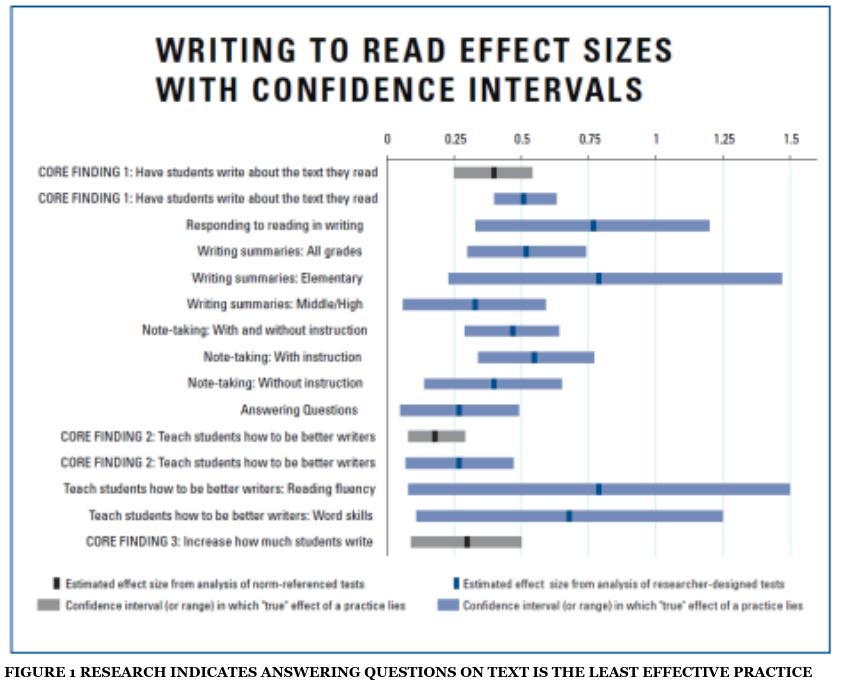
Students are assigned the Cornell note taking method because of the strong supporting research (Figure 1). Research indicates answering questions on text to be least effective for supporting reading comprehension (Graham, 2010). Cornell note taking supports higher level thinking such as application, synthesis, and analysis (Jacobs, 2008). Note taking is one of the “most powerful skills students can cultivate” by providing “students with tools for identifying and understanding the most important aspects of what they are learning.” (Marzano, 2001). It supports encoding the information for long term recall more effectively than guided notes and questionnaires (Jacobs, 2008). Note taking is known to be an effective strategy “if it entails attention focusing and processing in a way compatible with the demands of the criterion task.” (Armbruster, 1984) In effective note taking, research suggests, happens when “students failed to take notes in a manner that elicited sufficiently deep or thorough processing.” (Armbruster, 1984)
Informal feedback from students shows the task is generally disliked. The two periods are not maintained strictly as silent working periods, though distraction is generally minimal. Weaker students are observed to be often off task. Examination of work accomplished throughout the period indicates some weaker students complete only a page during the whole time. The completion rate for this task only averages 80% in each topic September-January 2013-2014 grades seven through nine (N=54). Increasingly, this task is coming in late and poorly done with the mean score at only 72. The lack of sustained attention to task during the class periods allotted for this task likely decreases the effectiveness of the task, especially memory of the information (Armbruster, 1984).
WHAT DIFFERENCE DOES PERFORMANCE ON THE READING TASK MAKE?
Five students in the sample who had a passing average for the reading tasks assigned in the 2013-2014 school year to date failed an interim examination1.
Eighteen of fifty-four students in the sample (33%) have a failing (below 65) average for the reading tasks. This includes scores of zero assigned for incomplete tasks. Half of the students who have a failing average for the reading tasks failed an interim exam. Five (9%) failed both interim examinations and four (7%) failed one of two interim examinations.
Only nine of eighteen students with a failing average on the reading task were able to pass both interim exams.
“Interim examinations” are ten-week tests of knowledge of course content going back to the start of the school year.
“Interim examinations” are ten-week tests of knowledge of course content going back to the start of the school year.
The reading task score measures how well students extracted the “study-worthy” ideas from the source text and prepared this content for learning. In this sample it was a weak predictor of performance on both the topic final test (correlation is 0.419) and the interim examination (correlation is 0.334). This stands to reason, since the measurements are for different things. Final tests and interim examinations are measures of knowledge of content.
For the 16th topic of study in grade eight, the task was set up as a “test”. Students were given 30 minutes to complete 5 pages. Students who needed more time received it, though a timer was left obvious and the room remained silent. Students commented that they felt they got a lot done in the more disciplined atmosphere. I am now assured that the class has completed the requisite reading assignment to understand the upcoming lessons and that the task was carried out in the most meaningful way possible.
Since the pandemic, learning from video has become more and more applied in secondary classrooms. In some quarters there were concerns that the demands of learning from video are different than the consumption of video for entertainment that most students engaged in such that student engagement with video lessons would likely be shallow. This shallowing hypothesis has not been consistently supported in the research, however (P. Delgado · Ø. Anmarkrud · V. Avila · L. Altamura · S. M. Chireac · A. Pérez · L. Salmerón).
It is certainly true that students viewing a video that is more than some six minutes long may find their mind wandering, but there are effective methods to teach students that skill set necessary to learn from video and to maximize the benefit.
Effective use of video as an educational tool is enhanced when instructors consider three elements: how to manage cognitive load of the video; how to maximize student engagement with the video; and how to promote active learning from the video.
Brame
1. The Innovation “Etude” Maximizes Active Learning
Innovation’s Etude is an app that maximizes active learning from video. I used this myself extensively with an 11th grade US History class in the 2021-2022 school year. The Etude is a research-supported application that takes a little time to create, but once done is there for your students year after year. Studies show that students who complete video-based learning tasks with students that include interpolated questions performed significantly better on subsequent tests of the material and reported less mind wandering that those who watched passively (Brame).
Teachers using the Etude to create video lessons can opt to add questions in multiple-choice or short answer format. These serve as guiding questions. Providing guiding questions to students promotes active learning by “share[ing] learning objectives with students, thus increasing the germane load of the learning task and reducing the extraneous load by focusing student attention on important elements. (Brame).” Some of my students liked to run down the questions and answer them before watching the video. They would then correct the wrong responses as they watched the video. This is a highly effective method that I encouraged all students to do.
In an Etude, questions do not appear unexpectedly in a dialogue box to interrupt the video like at some websites. Teachers can opt to set a cue point for their questions so that the question becomes highlighted at the right time when the video has given the answer. the video pauses gently while the student responds.
Students engaged in an Etude lesson can control the video playback and are encouraged to re-watch when they need to. Studies show that “[s]tudents who were able to control movement through the video, selecting important sections to review and moving backward when desired, demonstrated better achievement of learning outcomes and greater satisfaction.” (Brame)
The Etudes are self-scoring for multiple-choice and there is an AI grading assistant to help teachers score short answer questions that is easy to train. The scoring app is designed for maximum efficiency. instead of scoring a whole student page at a time, the scoring app prompts the teacher to view students answers one question at a time. that is, you would score all the question ones, then all the questions twos, etc. This increases accuracy and decreases time on task for grading.
2. Summarize the Content
For the busy teacher who may not have time to develop comprehension questions on video lessons, assigning students to summarize the content or take notes from it is an effective practice. Note taking from video lessons has been found to ” help struggling readers overcome their difficulties when learning from text blogs but not from video blogs.” Further, “Studies with undergraduate students […] demonstrated that students instructed to take notes recalled more information from a video lecture than the control group.” (Hashem Ali Issa Almuslamani, Islam A. Nassar & Omar Rabeea Mahdi)
Another strategy for engaging students in video learning that Innovation can help you accomplish is proctored viewing. This application is very simple: it monitors student screen activity during the playing of a video such that it can increase the chances of active engagement. The proctor notes are then submitted when the video ends.
Proctored viewing is less effective that the Etude or having students summarize the content. Proctored viewing probably works best for videos that are six to nine minutes long. Studies found that “the median engagement time for videos less than 6 minutes long was close to 100%–that is, students tended to watch the whole video. As videos lengthened ,however, student engagement dropped, such that the median engagement time with 9- to 12-minutevideos was ∼50%, and the median engagement time with 12- to 40-minute videos was ∼20%. In fact, the maximum median engagement time for a video of any length was 6 minutes. Making videos longer than 6–9 minutes is therefore likely to be wasted effort” (Brame).
[V]ideos […] have a direct and positive effect on increasing the students’ participation in the classroom.
Hashem Ali Issa Almuslamani, Islam A. Nassar & Omar Rabeea Mahdi
When students have submitted their proctor notes, the teacher can quickly view an easy to read summary of each student’s interaction with the video lesson. From there, teachers can discern the level of engagement to some degree. The proctor notes reveal when the student started or paused the video, for how long, and how much of it ran on the screen.
The proctored video app is useful when students are already likely to be engaged with a short video because of interest or prior knowledge and when there is some followup activity in class using the content. Videos are shown to increase class participation, so proctored video assignments can be useful tools to monitor some aspects of student engagement and support some accountability.
Innovation offers three research-based paths to engagement and accountability in video lessons. The apps were designed by working teachers and tested out by very ambitious teenagers who like to try to find software bugs. Why not give Innovation a try?
Sources
Almuslamani, H., Nassar, I., Mahdi O. (2020, May 12). The Effect of Educational Videos on Increasing Student Classroom Participation: Action Research. College of Administrative Sciences, Applied Science University, Kingdom of Bahrain. Retrieved 24 April 2023, from https://www.sciedu.ca/journal/index.php/ijhe/article/view/17480
Brame, C. J. (October 2017). Effective Educational Videos: Principles and Guidelines for Maximizing Student Learning from Video Content. CBE—Life Sciences Education Vol. 15, No. 4. Retrieved 24 April 2023 from https://www.lifescied.org/doi/10.1187/cbe.16-03-0125.
Delgado, P., Anmarkrud, &O., Avila, V., Altamura, L., Chireac, S. M., Pérez, A., & Salmerón, L. (2021, November 30). Learning from text and video blogs: Comprehension effects on secondary school students – education and Information Technologies. SpringerLink. Retrieved April 24, 2023, from https://link.springer.com/article/10.1007/s10639-021-10819-2
If it’s a conceit of middle age to presume to have some accumulated wisdom or something to share, I apologize and ask your indulgence here. As I transition into retirement, I just can’t resist combing through my long career to try to find something of value.
For this exercise, I would like to imagine myself a guest speaker at a college course for aspiring school administrators. This is the kind of thing I would like to say…
Now, I’ve never been a public school administrator and nor have I ever aspired to such. I appreciate the enormous obstacles to success in this field even if not from personal experience. I have this idea that a person studying to become a school administrator could possibly find something useful in the views of a subordinate.
“Potestas (power) is the ability to do something, while auctoritas (authority) is the capacity to lead, and it comes from the respect one commands by reason of his dignity, his character, his knowledge, and his achievements. True leadership is the combination of both potestas and auctoritas.”
Cicero, De Legibus (On the Laws)
I taught middle and high school social studies. I got a chance in that time to teach about leadership and government in the past; what worked and what did not, maybe with some hypotheses as to why. An explanation from Roman civilization of note differentiated between two leadership powers: potestas and auctoritas. Potestas is the brute force to compel cooperation that societies confer upon their leaders. This is the power to force, physically or though threat of sanction, the cooperation of subordinates. Auctoritas, on the other hand, is the respect subordinates have for the leader that is born of leadership competence and compassion. Inevitably, a leader must get the cooperation of subordinates who may not choose that course of action. Leaders who rely on potestas use threats and sanctions. Leaders who employ auctoritas will get the participation of the unwilling out of respect. Roman philosophers regarded the leader who can lead with auctoritas, who seldom needs to resort to potestas, to be the superior leader. A society under such a leader will prosper and thrive in a more long-term and sustainable way.
Metaphors that work, metaphors that do not.
A metaphor that is apt for the skillful manager, the executive who operates with auctoritas: The Gardener. The gardener does not necessarily know how the tree produces its fruit, and they do not need to, but they do know how much sunlight the tree needs, what kind of solid promotes its growth, what pruning patterns best promote tree health and strong fruit yield. The good admin is a gardener who promotes the growth of their garden by creating the conditions for their success.
“Authority (auctoritas), not coercion (coercitio), creates obedience.”
Livy, Ab Urbe Condita (From the Founding of the City)
Here is a metaphor that is apt for the ineffective administrator, the executive who fails under the modus operandi of auctoritas: The School Bus Driver. The school bus driver is in charge. They are the only adult on the bus, so they are the only real expert on how to safely get to school. Everybody better sit down and behave on this ride! This admin sees themself as the central visionary of the journey; the only legitimate commander. The value of passengers is relative to their obedience, loyalty, and willingness to take the ride wherever the bus driver decides is the best road to take.
“To lead the people, walk behind them.”
Lao Tzu
The reason that the school bus driver is a bad admin is simple: teachers are not analogous to kids on a bus. Kids on a bus are young, innocent, inexperienced, limited by their immaturity. Teachers are highly educated professionals whose knowledge and experience in their subject will surpass that of the admin except for maybe subjects the admin once taught. You can tell when you’re in the school bus driver’s meeting when you realize the supervisor is hearing you but not listening to you.
A metaphor that is apt for the good admin, one who guides by auctoritas and finds success: The Tug-o-war Anchor. The Tug-o-war anchor is the person in the back of the rope. They signal the group to pull together when it is time. They arrange the team members along the rope to pull where they are most suited. The goal is created by the team, not by the leader’s particular vision or prejudices.
The first quality for a commander-in-chief is to be a man of virtue. His authority must be based not only on his power but also on his character.”
Sallust, The Jugurthine War
How can a leader best approach morale problems on their staff?
The proof of the existence of a morale problem is that someone says it; nothing more is needed. If a lot of people say it, then it is a serious problem. If many drop out of committees, it’s not a sign they are lazy, but it’s a sign they no longer have buy-in. Why did that happen?
Potestas leaders eventually have morale problems. There is high turnover is workplaces with weak leaders. Denial or debating whether things are actually all that bad denigrate the listener and trivialize their feelings in ways that have no possible good outcome. That path only earns the contempt of subordinates. An effective leader works to identify the causes of the morale issue and then seeks the counsel of those affected to arrive at reasonable remedies. Leaders accept all morale claims as unquestioningly legitimate and seek remedies as best as possible.
How can a leader best view themself in relation to the educational institution?
Unlike in the private sector where subordinates are often less skilled or knowledgeable than managers, in education the chief executive’s main purpose is to harness the potential of subordinates whose knowledge and expertise is superior to their own in their respective domains. The educational institution that reflects only the vision of the executive officer is culturally impoverished. School leaders understand they do not always know best. They seek regular information from department heads. They accept the direction to which research and regulations point even if it does not jive with their “gut”.
How can a leader enjoy the loyalty and support of subordinates even when they must take decisions they oppose?
Good leaders will have already built a reservoir of goodwill among subordinates. From time to time subordinates will need something extra or unusual: a little time off, an indulgence for a mistake, etc. Such little things are opportunities to build a reservoir of goodwill such that generosity and indulgence from time to time creates an attitude they will fall back on in times when executives must choose an unpopular but principled path. Executives in such cases are also prepared to give sound and convincing reasons for their claims that any reasonable person holding the opposing view would accept as defensible.
A leader’s power is not enough to inspire loyalty and obedience from their subordinates. Instead, a leader must possess personal virtues, such as courage, integrity, and wisdom, that inspire trust and respect in others. This idea reflects the Roman concept of virtus, or the combination of courage, excellence, and morality, as the foundation of leadership
Leaders Must Be Good Communicators
Leaders who are unskilled often communicate poorly. They often fail to convince the listener of an opposing view. They know they have the authority to impose their view and it shows in their manner. Being unresponsive is another communication flaw. Leaving messages unanswered is not a legitimate way to deny a query.
When a leader who relies on potestas attends a meeting to observe the input of subordinates, they arrive with their mind already made up and with a view to performing the show of hearing what subordinates have to say. When a leader who effectively manages with auctoritas arrives at a meeting with subordinates, the plan will be the one the group arrived at by consensus. These effective leaders say things like “once we all agree, we will…”
One should maintain an abiding and unwavering respect for the truth. One should strive to establish a workplace that is stable, predictable, and intellectually prosperous. Subordinates should not come to work wondering what will befall them that day; what aggression they will have to defend against. The ancients knew this well and it is a body of wisdom well worth considering in the present. I am not sure that good leadership can even be taught or studied. It seems very likely to me that some people are simply born with an innate leadership intelligence, a social intelligence, that other people can appreciate and respect.